GhostTrack is a simple information gathering tool that finds publicly available details related to IP addresses, phone numbers, and usernames. It helps explore different types of publicly available information from a single terminal-based tool. You can install GhostTrack in Termux to perform basic OSINT and reconnaissance tasks using simple commands.
How to Install GhostTrack in Termux
Below are the simple commands to install GhostTrack in Termux. Copy and run each command one by one to install the tool in your Termux terminal.
Update Termux packages first.
pkg update && pkg upgrade -y
Install Git and Python packages.
pkg install git python -y
Clone the GhostTrack repository from GitHub.
git clone https://github.com/HunxByts/GhostTrack.git
Move into the GhostTrack directory.
cd GhostTrack
Install the required Python packages.
pip install -r requirements.txt
After completing the installation, GhostTrack will be ready to use in the Termux terminal.
How to Use GhostTrack in Termux
Start GhostTrack using the following command.
python ghostTR.py
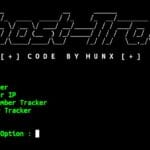
After running the command, the GhostTrack menu will open inside the terminal.
[ 1 ] IP Tracker
[ 2 ] Show Your IP
[ 3 ] Phone Number Tracker
[ 4 ] Username Tracker
[ 0 ] Exit

[ + ] Select Option :
Choose an option from the menu and enter the required information when prompted.
- IP Tracker : Displays publicly available information related to an IP address.
- Show Your IP : Shows your current public IP address.
- Phone Number Tracker : Performs basic lookup and information gathering on a phone number.
- Username Tracker : Searches for publicly available information related to a username.
- Exit : Closes GhostTrack and returns to the Termux terminal.
Whenever you want to use GhostTrack again, open the GhostTrack directory and run the tool.
cd GhostTrack
python ghostTR.py
Choose the option you want and GhostTrack will automatically perform the selected information gathering task and display the results in the Termux terminal.